Buy the wrong mouse and Valorant punishes you for it every single round. A flick that whiffs by two pixels in Ascent mid, a wide swing that drags half a second behind your hand, a wrist that cramps in the third map of a Radiant grind session: all of it traces back to 90 grams of plastic and a sensor chip most players never think about. In October 2026, the esports mouse market has split into two camps. One side chases sub-60-gram featherweight builds with sensors rated past 30,000 DPI. The other side leans on decade-old ergonomic shapes that competitive Valorant ranked players still request by name.
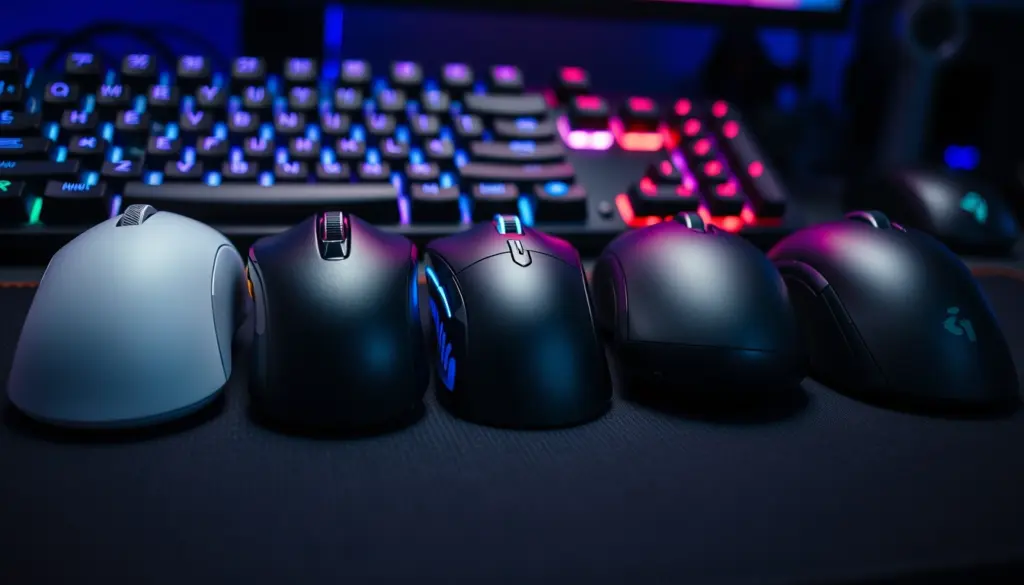
This guide compares five current mice built for or heavily adopted by competitive Valorant players: the Logitech G Pro X Superlight 2, its DEX variant, the Razer Viper V3 HyperSpeed, the BenQ Zowie EC2-CW, and the Pulsar X2 V3 and X2H V3. Every spec below comes straight from manufacturer product pages or named pro-gear databases, with pricing confirmed directly from brand storefronts as of this week. No invented latency numbers, no guessed release dates.
The peripheral market itself has shifted hard toward wireless in the last two product cycles. Every mouse in this roundup ships wireless-first, a sentence that would have sounded strange five years ago when wired mice still dominated LAN stages over latency fears. That fear has mostly evaporated. Logitech’s LIGHTSPEED protocol, Razer’s HyperSpeed, and the proprietary 2.4GHz links from Zowie and Pulsar were all built from the ground up to match wired response times rather than approximate them, and tournament organizers no longer ban wireless mice the way some did in the early 2020s. What’s left to debate isn’t wired versus wireless. It’s which wireless mouse fits your hand, your grip, and your budget, which is exactly what this guide breaks down.
What Makes a Mouse Actually Matter in Valorant
Valorant is a hitscan tactical shooter built around one-tap headshots, which means the margin between a clean duel and a dead teammate often comes down to milliseconds and millimeters. Three factors do most of the work: weight, sensor accuracy, and polling rate. A lighter mouse lets you correct a flick mid-swing without overshooting, which matters more in a low-TTK game than in something like a battle royale where sprays forgive mistakes. Sensor accuracy determines whether your crosshair lands exactly where your hand moved it, with no smoothing or acceleration error creeping in at high speeds. Polling rate controls how often the mouse reports its position to your PC, and a 1000Hz mouse checks in every millisecond, while an 8000Hz mouse checks in every 0.125 milliseconds.
None of this operates in isolation from the rest of your setup. Players who already dialed in a high refresh-rate panel, something we broke down in our 144Hz vs 240Hz comparison, are the ones who actually benefit from an 8000Hz mouse, because a slow panel will bottleneck the gains anyway. Mouse choice is the last piece of a latency chain that starts at your hand and ends at the pixel on screen, and every weak link in that chain erases the benefit of the others.
Grip style matters just as much as any spec sheet number, and it’s the factor most buyers skip over when they shop by DPI alone. Palm grip rests the whole hand on the shell and favors a slightly larger, taller mouse. Claw grip arches the fingers and rests mostly fingertips and the base of the palm on the shell, favoring a flatter, lower-profile shape like Zowie’s EC series. Fingertip grip lifts the palm entirely off the shell and favors the lightest possible mice, which is why Pulsar’s sub-55-gram shells have built a following among fingertip players chasing fast flicks. None of the five mice in this guide forces a single grip style, but each one leans toward a different one by design, which is the real reason “best mouse” questions don’t have a single universal answer.
Debounce time is the quieter variable hiding behind every click-latency conversation. It’s the brief delay a switch waits before confirming a click is real rather than electrical noise bouncing off the contact, and manufacturers tune it differently depending on whether they’re chasing raw speed or protecting against accidental double-clicks. Lower debounce settings shave fractions of a millisecond off every shot but raise the risk of misfires on an aging switch, which is part of why RTINGS flags debounce time specifically as a factor that shifts click-latency results independent of polling rate. None of the five manufacturers in this guide publish an exact debounce figure for their current models, so treat any specific millisecond claim you see elsewhere online with real skepticism unless it links back to an actual test.
The Five Mice This Guide Compares
Each mouse here represents a distinct design philosophy rather than a random pick from a storefront. The Logitech G Pro X Superlight 2 is the current default pick for palm-grip players who want the highest DPI ceiling available. The Razer Viper V3 HyperSpeed swaps a sealed battery for a user-replaceable AA cell, trading peak lightness for marathon runtime. The BenQ Zowie EC2-CW keeps the flat, low-arch shape that Counter-Strike players have used for over a decade, now built wireless. Pulsar’s X2 V3 and X2H V3 chase the sub-55-gram crowd with a 32,000 DPI sensor at a price well under its rivals.
- Logitech G Pro X Superlight 2: $159.99, 60g, HERO 2 sensor, up to 8,000Hz polling
- Logitech G Pro X Superlight 2 DEX: $129.99, 60g, HERO 2 sensor, 95-hour battery at 1,000Hz
- Razer Viper V3 HyperSpeed: $69.99, 59g without battery, Focus Pro 30K sensor, up to 280-hour battery
- BenQ Zowie EC2-CW: $149.99, 77g, flat ergonomic shape, 70-hour battery
- Pulsar X2 V3 / X2H V3: $99.95, 52-53g, XS-1 sensor, 32,000 DPI
Full Specs Comparison Table
The table below pulls every verifiable spec straight from each manufacturer’s current product page. Where a brand lists a range (like Logitech’s 100-44,000 DPI), we show the maximum, since that’s the figure most buyers search for.
| Spec | G Pro X Superlight 2 | Superlight 2 DEX | Viper V3 HyperSpeed | Zowie EC2-CW | Pulsar X2 V3 |
|---|---|---|---|---|---|
| Price (USD) | $159.99 | $129.99 | $69.99 | $149.99 | $99.95 |
| Weight | 60g | 60g | 59g (no battery) | 77g | 52g ± 1g |
| Sensor | HERO 2 | HERO 2 | Focus Pro 30K Optical | 3360-class | XS-1 |
| Max DPI | 44,000 | 44,000 | 30,000 | 3,200 | 32,000 |
| Max polling rate | 8,000Hz | 8,000Hz (with Pro receiver) | 4,000Hz (with HyperPolling dongle) | 1,000Hz | 1,000Hz |
| Standard polling rate | 1,000Hz | 1,000Hz | 1,000Hz | 125/500/1,000Hz | 1,000Hz |
| Battery life | Not published | 95 hours at 1,000Hz | 280 hours at 1,000Hz / 75 hours at 4,000Hz | 70 hours, constant movement | Not published for V3 |
| Switch type | LIGHTFORCE hybrid optical-mechanical | LIGHTFORCE hybrid optical-mechanical | Optical | Mechanical | Mechanical |
| Wireless tech | LIGHTSPEED | LIGHTSPEED | HyperSpeed | 2.4GHz proprietary | 2.4GHz proprietary |
| Max acceleration | >88G | >88G | Not published | Not published | 50G |
| Tracking speed | >888 IPS | >888 IPS | Not published | Not published | 750 IPS |
Logitech’s own spec sheet lists “8/88/888” as its standard acceleration and tracking-speed notation, not a typo, so those figures are correct as published. Source: Logitech G PRO X Superlight 2 product page.
Weight and Grip Style: Why Grams Decide Duels
A 25-gram gap between the Zowie EC2-CW and the Pulsar X2 V3 sounds small until you’ve spent four hours in a Radiant lobby. Lighter mice let you brake a flick faster, which reduces overshoot on fast peeks. But lighter isn’t universally better. Zowie built the EC-series shape specifically for claw and fingertip grips that want more surface area under the palm for stability during slow, precise tracking, a style still common among former Counter-Strike players who moved to Valorant. The Pulsar X2H V3, at 53 grams with a slightly taller hump than the X2 V3’s 52-gram flatter shell, splits the difference for players who want low weight without a fully flat profile.
Razer’s approach with the Viper V3 HyperSpeed is different again. Without its AA battery, the mouse sits at 59 grams, competitive with the Superlight 2. Drop the battery in and it jumps to 82 grams, a 23-gram swing you control depending on whether you prioritize raw lightness or multi-day battery runtime. That’s a tradeoff none of the sealed-battery mice on this list let you make.
Sensor and DPI: HERO 2 vs Focus Pro 30K vs XS-1 vs the 3360
DPI ceilings get marketed hard, but almost no competitive Valorant player runs anywhere near 44,000 or 32,000 DPI. Data from pro-gear tracker Setup.gg shows about half of Valorant pros run 800 DPI, with roughly 40 percent running 400 DPI, numbers that have barely moved in years. What the DPI ceiling actually buys you is headroom and consistency at the settings you do use, since a sensor rated for 44,000 DPI tends to track cleanly at 800 DPI with none of the jitter or angle-snapping that cheaper sensors introduce at low counts.
Optical vs the Older 3360-Class Sensors
Zowie’s EC2-CW and EC3-CW both ship with a 3360-class sensor, which BenQ’s own regional pages list inconsistently as “3360” on some pages and “3370” on others, a discrepancy worth checking against your specific regional listing before buying. Either way, it caps out at 3,200 DPI, a tenth of what the HERO 2 or XS-1 sensors offer. For a player running 800 DPI that ceiling changes nothing in practice. For a player who wants headroom to experiment with sensitivity without hitting a wall, it’s a real limitation. Source: ZOWIE EC2-CW official spec page.
Mousepad and Surface Compatibility: The Overlooked Variable
A premium sensor can still misbehave on the wrong surface, which is why serious players treat the mousepad as part of the mouse purchase rather than an afterthought. TenZ’s documented setup pairs his mouse with an Artisan FX Zero XL pad, a cloth surface built specifically for consistent glide under fast flicks rather than maximum control friction. Harder, slicker surfaces generally favor the lighter mice in this guide, since less weight means less force needed to overcome friction on a fast swipe, while softer cloth surfaces tend to favor the heavier, more stable shells like the Zowie EC2-CW during slow tracking.
Lift-off distance is the other half of this equation, and it’s a spec none of the five manufacturers in this comparison published a precise figure for, so we won’t invent one. What we can say generally is that every sensor here (HERO 2, Focus Pro 30K, the 3360-class chip, and XS-1) uses optical tracking designed to ignore the mouse the instant it leaves the pad surface, which matters most for players who lift and reposition between flicks rather than drag continuously.
Polling Rate and Click Latency: What the Data Actually Shows
Polling rate math is simple arithmetic, not marketing. At 1,000Hz, a mouse reports its position every 1 millisecond. At 4,000Hz, every 0.25 milliseconds. At 8,000Hz, every 0.125 milliseconds. The Logitech G Pro X Superlight 2 and its DEX sibling both reach 8,000Hz, the highest ceiling in this comparison, though DEX needs the separate Pro Lightspeed receiver to hit that number. The Viper V3 HyperSpeed tops out at 4,000Hz and only with its optional HyperPolling dongle attached, which also cuts battery life from 280 hours down to 75 hours. The Zowie and Pulsar mice here cap at a standard 1,000Hz.
Independent click-latency benchmarking is where the data thins out. RTINGS maintains a published methodology for testing mouse click latency, noting that polling rate, debounce time, and battery-saving features all shift the result, but RTINGS has not yet posted comparative millisecond figures for every mouse in this specific lineup. Source: RTINGS Mouse Control Tests: Click Latency. What we can say with confidence, because it’s simple physics rather than a benchmark claim, is that doubling your polling rate halves the theoretical reporting delay, and that gain only shows up if your monitor’s refresh rate and your GPU’s frame rate can actually keep pace, which is the same bottleneck we cover in our 144Hz vs 240Hz breakdown.
Why Polling Rate Alone Doesn’t Win Gunfights
System-level latency reduction tools matter just as much as the mouse’s own reporting rate. Both Nvidia and AMD ship their own render-queue tools, and we’ve covered the setup process for each separately in our NVIDIA Reflex 2 guide and our AMD Anti-Lag 2 guide. A mouse reporting at 8,000Hz feeding into a render pipeline that’s queuing three frames deep will still feel sluggish, which is why the full latency chain, not any single component, decides how a duel actually feels.
Wireless Tech and Battery Life Compared
Battery life varies more across this lineup than almost any other spec. The Viper V3 HyperSpeed’s 280-hour rating at 1,000Hz dwarfs everything else here, a direct result of using a removable AA cell instead of a sealed lithium battery. The tradeoff is the 23-gram weight jump once that battery is installed. The Superlight 2 DEX rates 95 hours at 1,000Hz, while the standard Zowie EC2-CW rates 70 hours under constant movement, a slightly more conservative real-world test condition than Logitech’s.
Battery Anxiety in Tournament Settings
For LAN competitors, a dead mouse mid-match is a worse outcome than a few extra grams. The Viper V3 HyperSpeed’s AA-battery design means a competitor can swap a fresh battery between maps with zero downtime, something impossible on a sealed-battery design that needs a USB cable plugged in to keep playing while it charges. That single design choice is why some tournament-focused players tolerate the heavier shell.
The receiver and dongle situation adds a layer most buyers don’t notice until after checkout. Logitech’s path to 8,000Hz on the standard Superlight 2 runs through its included LIGHTSPEED receiver, while the DEX variant needs the separate Pro Lightspeed receiver sold on its own to hit that same ceiling, a detail that changes the effective price of “the fastest Logitech setup” depending on which SKU you start from. Razer’s HyperPolling dongle works the same way on the Viper V3 HyperSpeed, unlocking 4,000Hz at the cost of a shorter 75-hour battery window and an extra line item on your receipt. Neither Zowie nor Pulsar asks you to buy anything extra to hit their advertised polling ceiling, since both cap at a standard 1,000Hz out of the box with no upsell path.
Pricing Breakdown: MSRP, Street Price, and Refurb Deals
Price spread across this lineup runs from $69.99 to $179.99, a gap of $110 for mice aimed at the same core use case. Logitech also runs a refurbished channel directly through its own store, which undercuts new units by roughly 20 to 30 percent.
| Mouse | MSRP | Notes |
|---|---|---|
| Logitech G Pro X Superlight 2 | $159.99 | Standard colorways |
| Logitech G Pro X Superlight 2 Cyan | $179.99 | Limited-edition color, “championship winning” branding per Logitech |
| Logitech G Pro X Superlight 2 DEX | $129.99 | Asymmetrical shape, 95-hour battery |
| Logitech G Pro X Superlight 2 DEX SE | $129.99 | 88-hour battery per Logitech’s listing |
| Logitech Superlight 2 (Refurbished) | $114.99 | $45 off the $159.99 MSRP, sold direct from Logitech |
| Razer Viper V3 HyperSpeed | $69.99 | Confirmed via Razer’s own structured product data |
| BenQ Zowie EC2-CW | $149.99 | Three sizes: EC2 (79g), EC2-CW (77g), EC3-CW (76g) |
| Pulsar X2 V3 | $99.95 | Symmetrical shape |
| Pulsar X2H V3 | $99.95 | Slightly taller hump, same price as X2 V3 |
Pulsar undercuts every other brand here by a wide margin while still shipping a 32,000 DPI sensor, which explains why its X2 line has built a following among budget-conscious ranked grinders who don’t need Logitech or Razer’s brand-name software ecosystem.
International Pricing: What You’d Pay Outside the US
Pricing doesn’t translate one-to-one across regions. Logitech’s own UK storefront lists the standard G Pro X Superlight 2 LIGHTSPEED Wireless Gaming Mouse at £109.99, marked down from an original £139.99, a discount structure that doesn’t exist on the US listing at the same moment. That gap matters if you’re comparing prices across borders rather than assuming a flat currency conversion. Always check your region’s direct manufacturer page rather than relying on a converted US price, since promotional pricing and VAT handling shift the real number by a meaningful margin.
Software and Customization: G Hub vs Synapse vs Driverless
How you configure a mouse day to day depends entirely on which software ecosystem it locks you into. Logitech routes every Superlight 2 variant through G Hub, which handles DPI stages, polling rate selection, and onboard memory profiles. Razer’s Viper V3 HyperSpeed uses Synapse for the same category of settings, plus HyperPolling dongle pairing when that accessory is attached. Pulsar ships its own lightweight configuration utility for the X2 and X2H lines, used mainly to set DPI steps and check firmware updates rather than build complex macros.
BenQ Zowie takes the opposite approach on purpose. The EC2-CW and EC3-CW are explicitly marketed as driverless, meaning DPI and polling rate adjust through onboard buttons with zero software installed, a holdover from Zowie’s original Counter-Strike-era design philosophy where tournament organizers restricted what software competitors could run on provided PCs. If you’ve ever had a mouse’s companion app eat background CPU cycles mid-match, the driverless approach explains part of Zowie’s enduring appeal even with a DPI ceiling a tenth the size of its rivals.
That driverless-versus-software split also decides how portable your settings are. A Logitech or Razer player moving between a home PC and a LAN-provided rig needs G Hub or Synapse installed and signed in to restore saved profiles, which eats setup time between matches. A Zowie player just plugs in and the onboard DPI stage buttons work identically on any machine, no login, no software download, no waiting on a cloud sync. Pulsar sits in between: its configuration utility is lightweight enough to skip entirely if you’re happy with the out-of-box DPI steps, but isn’t required the way G Hub effectively is for unlocking the Superlight 2’s higher polling tiers.
How Valorant Pros Actually Set Up Their Mice
Gear-tracking site Setup.gg logs individual pro loadouts, and two entries stand out as genuinely verified rather than guessed. TenZ’s listed setup runs a Pulsar TenZ Signature Edition at 1,600 DPI with 0.173 sensitivity, working out to an eDPI of 276.80, at 1,000Hz polling. Aspas runs a Logitech G Pro X Superlight 2 White at 800 DPI with 0.37 sensitivity, an eDPI of 296.00, at 4,000Hz polling. Source: Setup.gg Best VALORANT Mouse 2026: Pro Gear Data Guide.
Those two numbers tell a bigger story than any single spec sheet. TenZ, playing on a signature mouse built around the lighter Pulsar chassis, runs a mid-range eDPI with standard 1,000Hz polling. Aspas, on the heavier Superlight 2, runs a near-identical eDPI but at four times the polling rate. Neither setup is objectively “correct.” Both players win matches on hardware tuned to how their specific hand and playstyle move, which is the real lesson for anyone shopping off a spec sheet instead of their own grip.
Gear data published on RaidGG’s pro-settings tracker adds another layer to TenZ’s setup specifically: a relaxed claw grip paired with an Artisan FX Zero XL mousepad, run at 800 DPI with 0.4 in-game sensitivity for an eDPI of 320 in that particular listing, a figure that differs slightly from the Setup.gg entry above because pro gear trackers pull from different snapshots in time and don’t always agree down to the decimal. The takeaway isn’t which number is “correct.” It’s that even a top-five global talent’s exact sensitivity shifts over a season, which should lower the pressure on any ranked player agonizing over the third decimal place of their own eDPI. Source: RaidGG TenZ Valorant Settings.
How those low-level settings translate into actual round wins is a separate question from gear alone, something our breakdown of post-plant utility usage in pro Valorant covers in more depth. A perfectly tuned mouse still won’t save a retake executed on bad utility timing, which is worth remembering before you blame your hardware for a lost round.
6 Real-World Buying Scenarios: Which Mouse Fits Your Game
- Budget-conscious Radiant climber: Pulsar X2 V3 at $99.95 delivers a 32,000 DPI sensor and 52-gram shell for under $100, the strongest spec-per-dollar ratio in this comparison.
- LAN or marathon-session competitor: Razer Viper V3 HyperSpeed’s 280-hour AA-battery runtime removes charging downtime entirely, at the lowest price in the lineup.
- Former CS player on a claw grip: BenQ Zowie EC2-CW keeps the flat, low-profile shape that shaped a generation of tactical-shooter muscle memory, now wireless.
- Palm-grip flick-shot player: Logitech G Pro X Superlight 2’s 8,000Hz ceiling and HERO 2 sensor give the most headroom for players who already run a high refresh-rate monitor and want every link in the chain maxed out.
- Small-hand fingertip-grip player: Pulsar X2H V3’s 53-gram shell with a slightly taller hump suits players who want low weight without the fully flat profile of the X2 V3.
- Wireless upgrade on a tighter budget: Logitech G Pro X Superlight 2 DEX at $129.99 undercuts the standard Superlight 2 by $30 while adding a published 95-hour battery rating.
Migrating to a New Mouse: A Step-by-Step Setup Guide
Switching mice mid-season can wreck your aim for a week if you do it carelessly. Follow these steps in order to keep your muscle memory intact.
- Write down your current DPI and in-game sensitivity before you unbox the new mouse. Multiply them together to get your eDPI, the number that actually matters for aim consistency.
- Set the new mouse to a clean DPI value such as 400 or 800, then recalculate your in-game sensitivity so the new eDPI matches your old one exactly.
- Match your polling rate to what your old mouse used as a baseline, then raise it gradually once you’ve confirmed your PC and monitor can sustain the frame rate to take advantage of it.
- Open Windows Mouse Settings and confirm “Enhance pointer precision” is off, since this setting adds acceleration that most competitive players disable system-wide.
- In Valorant’s settings menu, enable Raw Input Buffer, which bypasses extra input processing layers between your mouse driver and the game engine.
- Spend at least two full practice-range sessions re-building flick muscle memory before queuing ranked, especially if the new mouse’s weight differs from your old one by more than 10 grams.
- Re-run an aim trainer benchmark, such as Aim Lab’s standard routines, and compare your scores to your pre-switch baseline before trusting the new setup in a ranked match.
Converting Your Sensitivity (eDPI) So Your Aim Doesn’t Break
The formula below is the entire math behind a clean mouse swap. Keep your eDPI constant and your crosshair placement habits transfer almost immediately.
old_eDPI = old_DPI x old_sensitivity
new_sensitivity = old_eDPI / new_DPI

Example:
old_DPI = 800, old_sensitivity = 0.37  ->  old_eDPI = 296
new_DPI = 400
new_sensitivity = 296 / 400 = 0.74
Pros and Cons of Each Mouse
Logitech G Pro X Superlight 2
Pros: highest polling ceiling in this comparison at 8,000Hz, HERO 2 sensor rated to 44,000 DPI with headroom to spare, widely adopted across multiple esports titles beyond Valorant, which means resale value and community support stay strong. Cons: no published battery-life figure for the standard model makes it hard to compare runtime directly against the DEX variant or the Viper V3 HyperSpeed, and at $159.99 it’s the second-most expensive mouse on this list behind only the limited-edition Cyan colorway.
Logitech G Pro X Superlight 2 DEX
Pros: $30 cheaper than the standard Superlight 2 while keeping the same HERO 2 sensor and 44,000 DPI ceiling, plus a published 95-hour battery figure the standard model doesn’t disclose. Cons: the asymmetrical DEX shape won’t suit every grip style, and reaching the full 8,000Hz polling ceiling still requires buying the separate Pro Lightspeed receiver rather than getting it included.
Razer Viper V3 HyperSpeed
Pros: lowest price in the entire comparison at $69.99, a class-leading 280-hour battery life thanks to its swappable AA cell, and zero charging downtime at events since a dead battery is a 10-second swap rather than a cable plug-in. Cons: weight jumps from 59 grams to 82 grams once the AA battery is installed, a 23-gram swing some palm-grip players will feel immediately, and the 4,000Hz polling ceiling only unlocks with an extra-cost HyperPolling dongle that also cuts battery life down to 75 hours.
BenQ Zowie EC2-CW
Pros: a proven ergonomic shape built specifically for claw and fingertip grips, a driverless plug-and-play design that needs zero background software, and a straightforward 70-hour battery rating under constant movement. Cons: it’s the heaviest mouse in this comparison at 77 grams, and its 3,200 DPI ceiling sits at roughly a tenth of what the HERO 2, Focus Pro 30K, or XS-1 sensors in its rivals offer, even if most players never approach that ceiling in practice.
Pulsar X2 V3 / X2H V3
Pros: the strongest price-to-spec ratio in this entire comparison at $99.95, the lightest shells on this list at 52 to 53 grams, and a 32,000 DPI XS-1 sensor that undercuts every rival here by at least $50. Cons: Pulsar hasn’t published a battery-life figure for the current V3 generation the way its competitors have, and polling rate caps at a standard 1,000Hz without the 4,000Hz or 8,000Hz ceilings Razer and Logitech offer.
The Verdict: Which Mouse Should You Buy
There’s no single winner here, because the five mice in this comparison solve five different problems. If price-to-spec ratio is your deciding factor, the Pulsar X2 V3 wins outright: a 32,000 DPI sensor and a 52-gram shell for $99.95 beats every other mouse here on pure value. If battery anxiety at a LAN event is your real concern, the Razer Viper V3 HyperSpeed’s 280-hour AA-powered runtime, at the lowest price in the lineup, solves that problem better than anything else on this list. If you want the highest performance ceiling regardless of cost, the Logitech G Pro X Superlight 2’s 8,000Hz polling and HERO 2 sensor remain the benchmark the rest of the market is still chasing.
Whichever mouse you land on, treat it as one piece of a larger competitive setup rather than a silver bullet. We track the rest of that puzzle, from rank systems to hardware to the pro scene itself, across our full esports coverage, and the same rule that applies to mice applies everywhere else in this hobby: spend money on the weakest link in your chain first, not the flashiest spec sheet.
One more factor worth weighing before you check out is long-term support. Logitech and Razer both maintain multi-year software update cycles across G Hub and Synapse, and both brands sell official refurbished units directly, which is where that $114.99 Superlight 2 price point comes from. Pulsar and Zowie are smaller companies by comparison, which hasn’t hurt their build quality in either case, but it does mean a narrower accessory ecosystem and fewer third-party skins, grip tapes, and replacement shells built specifically around their chassis. If brand longevity and a wide accessory market matter to you as much as raw specs do, that’s a real point in Logitech and Razer’s favor even where the numbers on paper look close.
| Category | Winner | Why |
|---|---|---|
| Best overall performance | Logitech G Pro X Superlight 2 | 8,000Hz ceiling, HERO 2 sensor, 44,000 DPI |
| Best value for money | Pulsar X2 V3 | $99.95 for a 32,000 DPI sensor and 52g shell |
| Best for marathon sessions | Razer Viper V3 HyperSpeed | 280-hour battery, swappable AA cell |
| Best for claw grip | BenQ Zowie EC2-CW | Proven flat ergonomic shape, driverless setup |
| Best budget wireless upgrade | Logitech G Pro X Superlight 2 DEX | $129.99 with a published 95-hour battery |
Frequently Asked Questions
What DPI do most Valorant pros actually use?
According to pro-settings tracker Boostroyal, about half of Valorant pros run 800 DPI, with roughly 40 percent running 400 DPI. High DPI ceilings on modern sensors exist for headroom and tracking cleanliness, not because pros run anywhere near the maximum.
Is a lighter mouse always better for Valorant?
Not universally. Lighter mice help with fast flick corrections, but players on claw or fingertip grips, like those who favor the 77-gram BenQ Zowie EC2-CW, often prefer more shell weight for stability during slow tracking.
Do I need an 8,000Hz polling rate mouse?
Only if your monitor’s refresh rate and your GPU’s frame rate can actually sustain high enough numbers to make the gain visible. Pairing an 8,000Hz mouse with a 60Hz panel wastes most of the benefit.
What’s the cheapest mouse in this comparison that’s still pro-viable?
The Razer Viper V3 HyperSpeed at $69.99 is the lowest-priced mouse here, and its Focus Pro 30K sensor and 280-hour battery life make it fully competitive with pricier rivals.
Why do Zowie mice cap out at such low DPI?
BenQ Zowie has historically prioritized sensor cleanliness at low DPI over high ceilings, a design philosophy inherited from the Counter-Strike scene where most players run under 1,000 DPI anyway.
How much does switching mice hurt my aim?
Expect a temporary dip if you don’t match your eDPI carefully. Use the conversion formula in this guide’s migration section and budget at least two practice sessions before trusting the new setup in ranked.
Does a wired connection beat wireless for competitive play?
Not anymore at this price tier. Every mouse in this comparison uses a dedicated low-latency wireless protocol (LIGHTSPEED, HyperSpeed, or a proprietary 2.4GHz link) built specifically to match wired response times, which is why none of the current top esports mice ship wired-only.
Which mouse should a complete beginner buy?
Start with whichever shape fits your grip rather than chasing the highest spec sheet. For most newer players, the Pulsar X2 V3 offers enough sensor performance at $99.95 without overspending on polling rates and DPI ceilings that take months of practice to notice.
Does the mousepad matter as much as the mouse itself?
It matters more than most players assume. A top pro like TenZ pairs his setup with a specific cloth pad (the Artisan FX Zero XL) rather than leaving the surface to chance, because glide consistency changes how a given sensor and weight combination actually feels in your hand during a fast flick.
Should I buy the standard Superlight 2 or the DEX version?
Pick the DEX if battery anxiety or price matters more to you, since it’s $30 cheaper and publishes a 95-hour runtime the standard model doesn’t disclose. Pick the standard Superlight 2 if you specifically want the symmetrical shape over the DEX’s asymmetrical design, since the sensor and DPI ceiling are otherwise identical.
Related Coverage
- Uninstall Valorant, Keep League of Legends: Save 27GB in 11 Steps [2026]
- Build a Valorant Uninstaller: PowerShell Script in 12 Steps [2026]
- Uninstall Valorant, Restore Windows Security: 10 Steps [2026]
- Uninstall Valorant, Keep Vanguard: 12 Steps [2026]
- Build a CS2 Premier Rating Tracker: 12 Steps [2026]